Create Professional DVDs
For Free on Windows & Mac
DVDStyler is the ultimate open-source DVD authoring application. Burn your favorite videos to discs with interactive menus, multiple subtitles, and high-fidelity audio. Fully compatible with Windows 11 and macOS 16.
Why Choose DVDStyler in 2026?
While other tools charge premium prices, DVDStyler remains a powerful, open-source solution that handles the latest video codecs with ease.
Interactive Menu Design
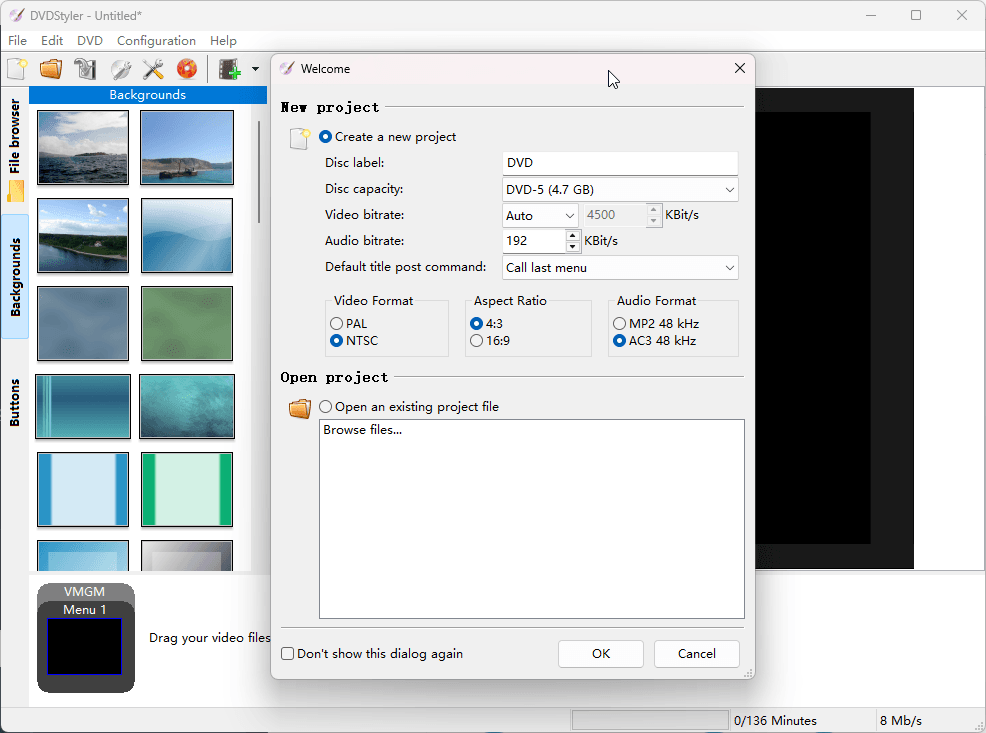
Don’t settle for plain discs. Create professional menus using 20+ built-in templates or design your own from scratch using scalable vector graphics (SVG). Add custom buttons, text, and images anywhere on the screen.
Powered by FFmpeg 7.0
The latest v3.3 beta 4 integrates the powerful FFmpeg 7.0 engine. This ensures flawless support for MP4, MKV, AVI, and HEVC/H.265 files, with multi-core processor support for lightning-fast transcoding.
Multi-Track Audio & Subtitles
Perfect for movie enthusiasts and archivists. Add multiple audio tracks (AC-3, MP2, MP3) and external subtitle files (SRT, SSA) to your project. Support for both NTSC and PAL standards is fully integrated.
Photo Slideshow Creator
Turn your holiday photos into a cinematic experience. Import images directly, add background music, and let DVDStyler generate a high-quality DVD slideshow automatically.
Advanced Scripting
For power users, DVDStyler allows custom DVD scripting. Take control of the navigation commands and define how the disc behaves when buttons are pressed or titles finish playing.
Totally Free & Portable
No hidden costs, no watermarks, and no registration required. As GPL-licensed software, you can use it for commercial projects or run it as a portable app from a USB drive.
Full Compatibility Matrix
DVDStyler 3.3b4 leverages the 2026 edition of FFmpeg, making it one of the few free tools capable of handling modern high-definition source files without pre-conversion.
| Category | Supported Formats |
|---|---|
| Video Input | MP4, MKV, AVI, MOV, WMV, FLV, HEVC (H.265), AVC (H.264), MPEG-4 |
| Audio Input | AC-3, MP3, MP2, AAC, PCM, DTS, OGG |
| Subtitle Format | SRT, SSA, ASS, VobSub, MicroDVD |
| Output Disc | DVD-5 (4.7 GB), DVD-9 (8.5 GB), Mini DVD (1.4 GB) |
DVDStyler vs. Others
*Most “Free” competitors on the market will embed a watermark in the middle of your video or limit the file duration unless you pay for a license. DVDStyler gives you full professional features with zero restrictions.
Check 2026 Version Compatibility →Is DVDStyler Safe in 2026?
We understand your concerns. While early versions (like v2.8) faced criticism for bundling browser toolbars, the modern DVDStyler v3.2.1 and v3.3b4 releases are completely free of adware, spyware, and Trojans.
🛡️ VirusTotal Verified
Every installer on our site is pre-scanned by 70+ antivirus engines. 0/74 Detection for v3.3b4-win64.exe.
📂 No Bundled Junk
We only provide the clean, official binaries. No “Incredibar,” no hidden search engines, just pure open-source software.
⚖️ GPL Compliance
Distributed legally under the GNU General Public License. We support the open-source community and provide source code links.
Pro Tip: Always avoid “Cracked” or “Pro” versions of DVDStyler found on third-party sites. As a free tool, there is no “Pro” version—those are often trojan-laden fakes. Stick to the official v3.3 series for safety.
Common Questions
Everything you need to know about DVDStyler in 2026.
Q: Does DVDStyler support Windows 11 and macOS 16?
Yes. The latest v3.3 series has been tested and optimized for Windows 11 (including the 24H2 update) and macOS 16 Sequoia. For Mac users, please ensure you download the 64-bit DMG package.
Q: Can I create Blu-ray discs with DVDStyler?
Currently, DVDStyler is strictly for Standard Definition (SD) DVD-Video (720×480 for NTSC, 720×576 for PAL). While it can import HD videos, it will transcode them to DVD-compliant formats. For Blu-ray authoring, you may need alternative professional tools.
Q: Why is my video not importing or showing “Error”?
This is usually due to outdated codecs. We highly recommend using DVDStyler v3.3b4, which includes FFmpeg 7.0. It provides much broader support for modern MP4 and MKV files than the older 3.2.1 version.
Q: Is it really free for commercial use?
Absolutely. As it is licensed under the GNU GPL, you can use DVDStyler to create discs for sale, for your business, or for educational purposes without paying any royalties or licensing fees.
Ready to start your project?
Get the cleanest, most stable version of DVDStyler today.
Go to Download PageWhat Can You Do with DVDStyler?
Beyond simple burning, DVDStyler is a versatile tool designed for various creative and professional needs.
Preserve Family Memories
Have old home movies on your smartphone or digital camera? Convert those MP4 files into a physical DVD that grandma can play on her TV. Use the Photo Slideshow feature to combine summer vacation photos with background music, creating a lasting gift for family reunions.
- ✔ Support for NTSC/PAL region standards
- ✔ High-quality MPEG-2 encoding for crystal clear TV playback
For Independent Filmmakers
Distributing your indie film or documentary? DVDStyler supports Multiple Titlesets, allowing you to include the main feature, “Behind the Scenes” footage, and director’s commentary all on one disc with professional navigation scripts.
- ✔ Add multiple SRT/SSA subtitle tracks
- ✔ Professional-grade AC-3 multi-channel audio
Version Evolution: 2024 – 2026
v3.3 Beta 4 Latest Release
Released: August 06, 2024 (Continuous Support into 2026)
- Core Update: Integrated FFmpeg 7.0 for superior HEVC/H.265 decoding.
- Optimization: Enhanced multi-core CPU usage during the multiplexing stage.
- Fix: Resolved menu rendering artifacts on Windows 11 high-DPI displays.
v3.2.1 Legacy Stable
Released: November 04, 2021
The long-standing stable release. While reliable, it lacks support for several modern codecs used by current smartphones (iPhone/Android).
The 2026 Tech Standard
In 2026, video files are larger and use more complex compression than ever. Our goal is to ensure DVDStyler remains the bridge between 4K digital files and the timeless physical DVD format.
Start Creating in 3 Simple Steps
Import Media
Drag and drop your video files (MP4, MKV, etc.) directly into the DVDStyler interface.
Design Menu
Pick a template and customize your buttons and background to match your theme.
Burn to Disc
Insert a blank DVD and click ‘Burn’. DVDStyler handles the conversion automatically.
Ready to Burn Your First DVD?
Join thousands of users who trust DVDStyler for their movie projects. Get the latest 2026-verified version with FFmpeg 7.0 support now.